


If you’re running Ingress NGINX in production, the clock is officially ticking. With maintenance set to permanently conclude in March 2026, the Kubernetes project has retired the ingress-nginx controller. After the deadline, there will be zero security patches, zero bug fixes, and zero new releases. Leaving your traffic management on autopilot is no longer a luxury; it’s a massive security risk.
In the recently released KubeLB 1.3.1, we resolved 4 CVEs with CVSS score of 8.8, which further stresses the need to transition to Gateway API.
Why Gateway API?
The official replacement for the Ingress API is the Gateway API, which is a major enhancement:
Role-based architecture. Gateway API introduces three layers — GatewayClass, Gateway, and Routes — that map cleanly to organizational roles. GatewayClasses and Gateways are managed by infrastructure teams. Routes are managed independently by application teams. Ingress never had this separation of concerns.
Multi-protocol support. The Gateway API natively supports HTTP, HTTPS, gRPC, TCP, and UDP routing using typed Route resources (HTTPRoute, GRPCRoute, TCPRoute, etc.), whereas Ingress was effectively HTTP-only.
Richer traffic management. Header-based routing, traffic splitting, request mirroring, and URL rewrites are all part of the standard API — no more controller-specific annotations.
Standardized across implementations. The Gateway API is implementation-agnostic. The API is the same whether you select Envoy Gateway, Cilium, Istio, or another provider. Your manifests are portable.
How KubeLB Can Help
Manually switching from Ingress to Gateway API means:
- Converting every Ingress resource to a Gateway + HTTPRoute pair
- Managing the migration of TLS certificates
- Planning DNS cutover (Gateway creates a new LoadBalancer with a new IP)
- Testing everything before changing traffic
KubeLB v1.3 takes care of this for you with its automated Ingress-to-Gateway-API converter. You can use it through the KubeLB Dashboard or the CLI, and it handles converting ingress-nginx resources to Envoy Gateway format — the approach we recommend.
What the Converter Does
- Audits your cluster to determine the conversion status of all Ingress resources
- Previews the precise Gateway API YAML that will be generated — before making any changes
- Converts Ingress resources into Gateway + HTTPRoute resources
- Copies TLS secrets to the Gateway namespace
- Generates Envoy Gateway policies where needed
- Tracks conversion status per resource (
new,pending,converted,partial,failed,skipped)
What You Need to Plan For
New IP address. A new external IP is created when the Gateway establishes a new LoadBalancer Service. You’ll need a DNS cutover plan:
- Blue-green: Set up the Gateway alongside Ingress, verify, and then switch DNS
- Gradual: Reduce DNS TTL values prior to migration, and switch one hostname at a time
- Automated with external-dns (recommended): If you’re using external-dns, configure it to watch both Ingress and Gateway API sources simultaneously. This lets external-dns manage DNS records for both resource types during the transition — no manual DNS updates, no resolution gaps. Once migration is complete, remove the Ingress sources from external-dns. This is the lowest-risk approach.
TLS certificates. Certificates that are already in place won’t transfer automatically. To issue fresh certificates for Gateway resources, you will need cert-manager if you are using it. To prevent validation outages during the transfer, consider using DNS01 challenges.
No canary between old and new. Traffic cannot be divided between Ingress and Gateway. All-or-nothing switching for each hostname is managed via DNS. Plan accordingly. If you use external-dns with dual sources, this becomes less painful — DNS updates happen automatically as you convert each resource.
Transition with the KubeLB CLI
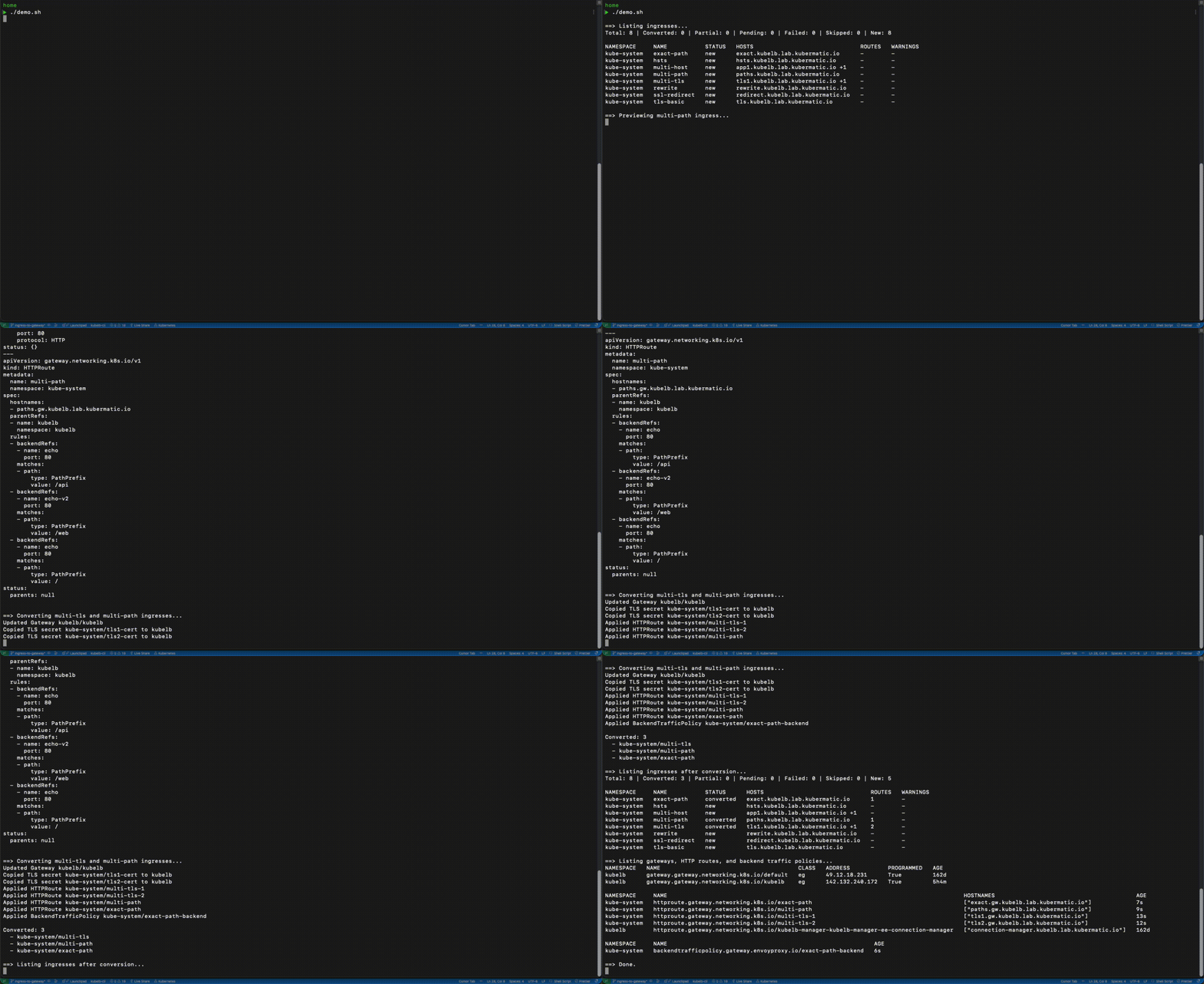
You can install KubeLB CLI using the following command:
go install github.com/kubermatic/kubelb-cli@v0.2.0
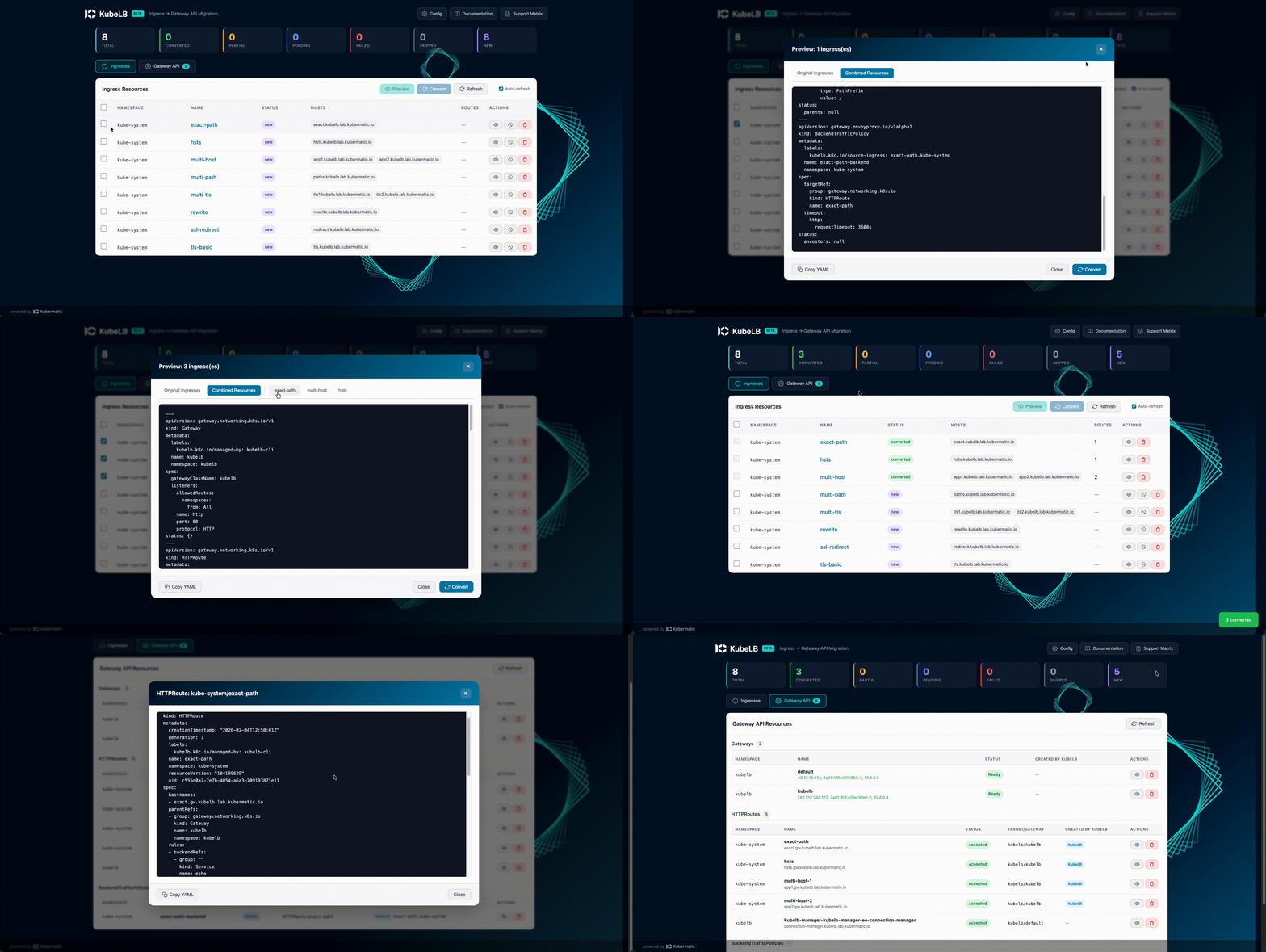
Using the KubeLB Dashboard
Prefer a visual interface? The KubeLB Dashboard offers the same conversion capabilities with a graphical UI:
kubelb serve
# Opens at localhost:8080
Using the KubeLB Dashboard to Migrate Ingress to Gateway API
Using CLI
Step 1: Audit Your Ingress Resources
See what you’re working with:
# List all Ingress resources across all namespaces
kubelb ingress list -A
This displays the current conversion status for each Ingress resource. You’ll see right away which ones need attention.
Step 2: Preview the Conversion
Before changing anything, preview what the converter will generate:
# Preview a single Ingress resource
kubelb ingress preview my-app -n default

# Preview all resources across all namespaces
kubelb ingress preview -A
Without changing your cluster, this produces the Gateway API YAML that would be generated, including the Gateway, HTTPRoute, TLS secrets, and policies. Review it. Validate it. Share it with your team.
Step 3: Convert
Once you’re comfortable, run the conversion:
# Convert a single resource
kubelb ingress convert my-app -n default

# Convert everything (dry-run first!)
kubelb ingress convert --all --dry-run -A

# Convert everything for real
kubelb ingress convert --all -A
You can also export manifests to files for GitOps workflows:
kubelb ingress convert --all -A --output-dir ./gateway-manifests
Step 4: Skip What Shouldn’t Be Converted
Some Ingress resources might need to stay as-is — maybe they use a different controller. Annotate them to skip:
kubectl annotate ingress my-legacy-app kubelb.k8c.io/skip-conversion=true
A Recommended Migration Strategy
Here’s the strategy we recommend based on our experience:
- Audit — To determine your scope, run
kubelb ingress list -A - Set up external-dns dual sources — If using external-dns, add Gateway API sources alongside your existing Ingress sources. This automates DNS management during the transition
- Start in staging — Convert non-production environments first. The converter is in beta; validate in a safe environment
- Preview everything — Prior to each conversion, use
kubelb ingress preview - Lower DNS TTLs — A few days before the actual cutover, lower your DNS TTL values
- Convert and validate — Execute the conversion, confirm that the Gateway resources are healthy and routing correctly
- Switch DNS — If using external-dns, this happens automatically. Otherwise, update DNS records to point to the new Gateway LoadBalancer IP
- Monitor — Keep an eye on traffic, error rates, and certificate status
- Clean up — Once stable, remove the old Ingress resources, Ingress NGINX controller, and Ingress sources from external-dns
Don’t Wait
Running an unpatched Ingress controller is a liability, even if your current deployments won’t break overnight. The switch to Gateway API represents a move to a more capable, secure, and sustainable routing architecture — not merely swapping out one controller for another.
KubeLB’s migration tooling takes the pain out of this transition. Audit your resources, preview the changes, and convert at your own pace.
References:


