


Your platform team built a service catalog. Developers can browse it, find what they need, and then… file a ticket. Two days later, they get their database. Three days if it’s a Friday.
This is the gap that Internal Developer Platforms are supposed to close. And for many organizations, the gap is still wide open.
Kubermatic Developer Platform (KDP) is an Internal Developer Platform built to close it, from the infrastructure up, not the UI down. It is built on kcp, a CNCF Sandbox project that Kubermatic actively maintains. It gives platform teams a Kubernetes-native control plane with a service catalog that actually provisions resources, workspace-level isolation, and AI-assisted service creation. KDP went GA in January 2026.
This guide covers what KDP does, how it works, and who it’s built for.
The problem KDP solves
Platform engineering exists because developers shouldn’t need to understand infrastructure to ship software. But most organizations are stuck somewhere between “we have a wiki” and “we have a portal that links to a wiki.”
The typical experience looks like this:
- A developer needs a PostgreSQL database for a new service
- They search an internal wiki, Slack, or a service catalog
- They find the request process: a Jira ticket, a Terraform PR, or a message to the platform team
- They wait hours or days for provisioning
- They repeat this for every new resource
KDP replaces this workflow with self-service provisioning. A developer opens the service catalog, selects PostgreSQL, and gets a running database. No tickets. No waiting. No Kubernetes expertise required.
How KDP works
KDP has three layers: a control plane built on kcp, a sync mechanism that connects to service clusters, and a dashboard for developers to interact with.
The foundation: kcp workspaces
KDP is built on kcp, a CNCF Sandbox project that Kubermatic actively contributes to. kcp introduces a concept called workspaces: lightweight logical Kubernetes clusters that each operate as independent API servers.
Think of it this way. Instead of giving every team their own cluster (expensive, hard to manage) or sharing a single cluster with namespace-level RBAC (fragile, noisy-neighbor risks), kcp gives each team a workspace. Each workspace has its own API server, its own resources, and complete isolation from other workspaces, but they all run on shared infrastructure.
Workspaces are organized hierarchically. A root workspace sits at the top with nested child workspaces underneath. Platform owners control the top of the tree. Teams manage their own branches.
The bridge: api-syncagent
The api-syncagent connects the KDP control plane to the clusters where services actually run. It’s a lightweight connector deployed on each service cluster, the cluster managed by a service provider where workloads like databases, message queues, or compute resources actually live.
Here’s how it works:
- A service provider operates a cluster with their services (e.g., PostgreSQL via an operator, or cloud resources via Crossplane)
- They deploy the api-syncagent on that cluster with credentials from KDP
- They create
PublishedResourceobjects that define which resources from their cluster should appear in the KDP catalog - The agent syncs those definitions to the KDP control plane
- Developers see the published services in the catalog and can provision them directly
- When a developer provisions a service, the api-syncagent synchronizes the request to the local service cluster, where the service provider processes it
The developer never touches the service cluster directly.
The interface: KDP Dashboard
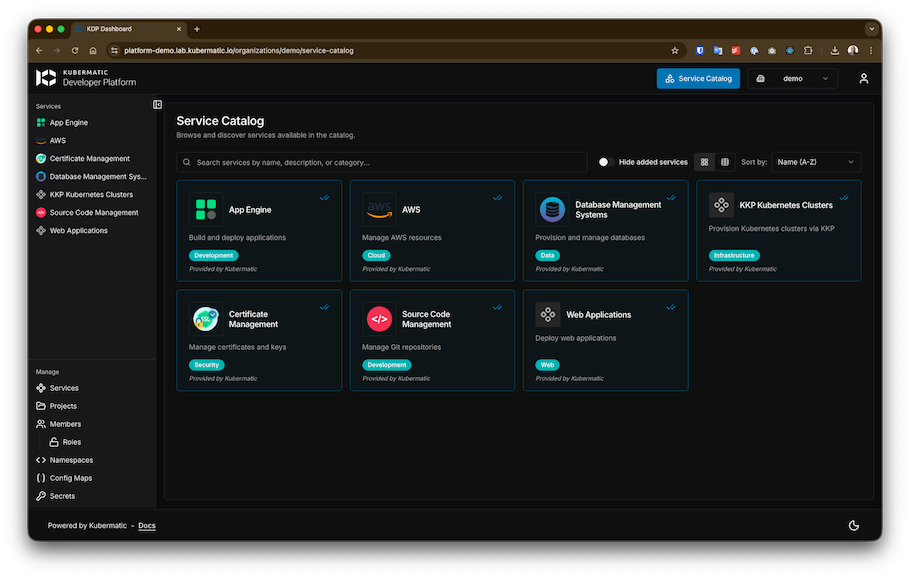
The dashboard is a web UI that talks directly to the Kubernetes API. Everything you can do in the dashboard, you can also do with kubectl. There’s no proprietary CLI or SDK.
From the dashboard, developers can:
- Browse the service catalog and see available services
- Provision a service instance with a form or via the AI Agent
- View status, connection details, and health of their resources
- Manage their workspace, invite team members, and organize resources
Service providers use the dashboard to register services, generate sync agent credentials, and monitor service health across their clusters.
Who KDP is for
KDP is designed for three roles:
Platform owners
Platform owners run the KDP installation itself. They manage the kcp deployment, configure authentication (KDP uses Dex for OIDC), assign top-level permissions, and ensure platform availability. They set the rules for the workspace hierarchy and decide which service providers can publish to the catalog.
Service providers
Service providers are the teams that operate actual infrastructure: databases, message queues, compute services, AI models. They manage their own service clusters, deploy the api-syncagent, and decide what to publish to the platform.
This is a key design choice: service providers are not bottlenecked by the central platform team. They manage their own clusters, their own operators, and their own publishing decisions. The platform team provides the marketplace. Service providers stock the shelves.
A service provider can use any technology behind the api-syncagent. Kubernetes operators, Crossplane for cloud resources, or custom controllers all work. The consumer never knows or cares what’s underneath.
Platform users (developers)
Developers consume services from the catalog. They own workspaces, organize their teams, and provision resources through the dashboard or kubectl. They never need to interact with the underlying service cluster.
When a developer creates a PostgreSQL instance from the catalog, they see status updates and connection details in their workspace. The fact that the database is running on a completely separate cluster, managed by a different team, is invisible to them.
Crossplane integration
KDP includes built-in support for Crossplane to expose cloud resources as platform services. A service provider can publish managed cloud services (an AWS RDS instance, a Google Cloud SQL database, an Azure Storage account) through the same catalog interface that handles in-cluster services.
The pattern:
- Service provider installs a Crossplane provider (AWS, GCP, Azure) on their service cluster
- They define Crossplane Compositions that abstract complex cloud resources into simple interfaces
- They create
PublishedResourceobjects to expose these compositions through KDP - Developers provision cloud resources from the catalog like any other service
This also enables cloud service filtering. The service provider explicitly defines which resources to publish, so developers only see approved services in the catalog. If your organization only permits certain cloud services, the provider publishes only those. Everything else is invisible, not just restricted.
AI capabilities
KDP uses AI in two ways: generating resources for developers and designing service forms for providers.
The workspace model also doubles as a governance layer for AI infrastructure. Organizations control which teams access which AI models or compute resources by choosing what to publish and to whom.
AI Agent: natural language to Kubernetes
KDP includes an optional AI Agent, deployed as a separate component during installation, that is built into the dashboard. Developers describe what they need in natural language (“a PostgreSQL database with 50GB storage for my analytics team”) and the agent generates the corresponding Kubernetes resource YAML.
The generated manifest appears in the dashboard for the developer to review and edit before submitting. The AI Agent requires an OpenAI API key.
AI UI Builder: prompt-designed service forms
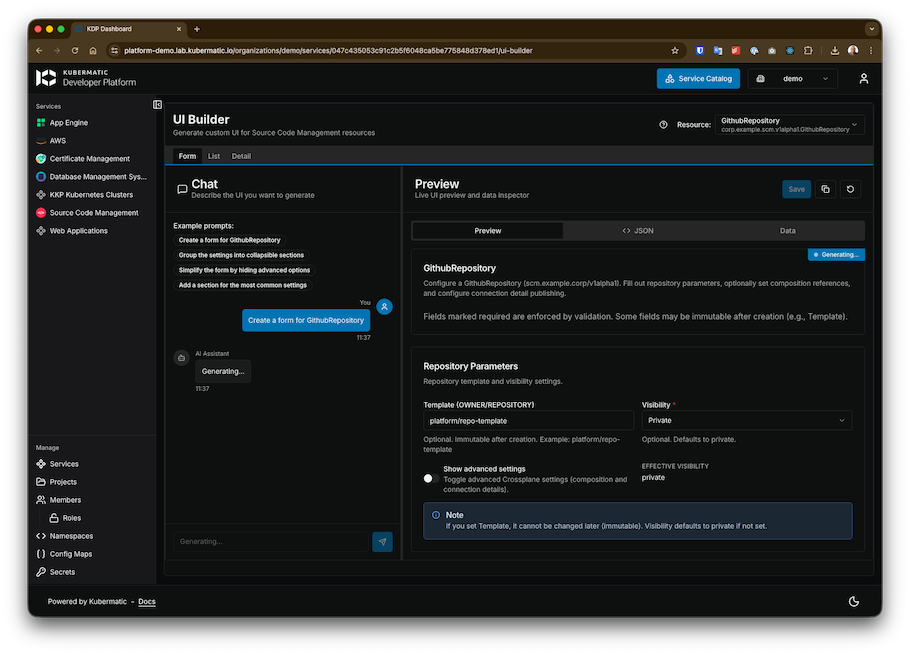
Service providers publish resources to the catalog, but the default provisioning forms are generic. Most service providers aren’t UI experts, and they shouldn’t need to be. KDP’s AI UI Builder lets service providers describe the interface they want in natural language and generates a custom form for their service.
A provider can prompt iteratively (“create a form with dropdowns for instance size”, “highlight required fields in red”, “add a tooltip explaining backup retention”) and the generated UI replaces the default form in the dashboard. Forms can also be configured via annotations in the service definition on the service cluster, giving providers a code-first alternative.
How KDP compares
vs. Backstage
Backstage is a developer portal framework. It provides a catalog and plugin system for building a custom developer UI. KDP is a developer platform. It provides the provisioning engine, multi-tenancy, and service lifecycle management underneath. They can work together: Backstage as the portal, KDP as the platform backend.
vs. Port / Cortex
Port and Cortex are commercial developer portals focused on the interface and catalog layer. They’re strong at discovery, scorecards, and developer experience. KDP focuses on the infrastructure layer: provisioning, workspace isolation, and service lifecycle. If you need a polished portal UI with deep integrations, Port or Cortex serve that role. If you need the engine that actually provisions and isolates resources, that’s KDP.
vs. Humanitec
Humanitec operates as a Platform Orchestrator with its Score specification for environment configuration. KDP takes a different approach, using standard Kubernetes APIs rather than a new specification. Both solve the backend orchestration problem, but KDP is more deeply tied to the Kubernetes ecosystem.
At a glance
| Feature | KDP | Backstage | Humanitec |
|---|---|---|---|
| Primary Focus | Infrastructure Orchestration | Developer UI & Portal | Platform Orchestration |
| Philosophy | Native Kubernetes APIs | Plugin-based Framework | Score (Workload Spec) |
| Multi-tenancy | Workspace-level (kcp) | UI-level RBAC | Environment-level |
| Cloud Integration | Crossplane (Native) | Plugins / Manual | Driver-based |
vs. DIY (Terraform + ArgoCD + Backstage + …)
Building an IDP from scratch means stitching together multiple tools and maintaining the integrations yourself. KDP provides an integrated stack so platform teams spend their time building golden paths instead of maintaining the platform.
Getting started
KDP requires a Kubernetes cluster (minimum 3 nodes) with a CSI driver, cert-manager, and an Ingress controller (NGINX or Gateway API). Installation follows a Helm-based workflow: cert-manager, then Dex for authentication, then kcp, then KDP controllers, then the dashboard, and optionally the AI Agent.
KDP is an enterprise product. You’ll need Docker registry credentials from Kubermatic to access the Helm charts. Contact Kubermatic for access and pricing.
Key takeaways
- KDP is a developer platform, not a portal. It provisions resources, not just catalogs them.
- Built on kcp (CNCF Sandbox) with workspace-level multi-tenancy on shared infrastructure.
- Kubernetes APIs all the way down. If you know
kubectl, you know KDP.


